Why Your Smart TV Has a Mysterious 'Service' Port and Why You Should Avoid It
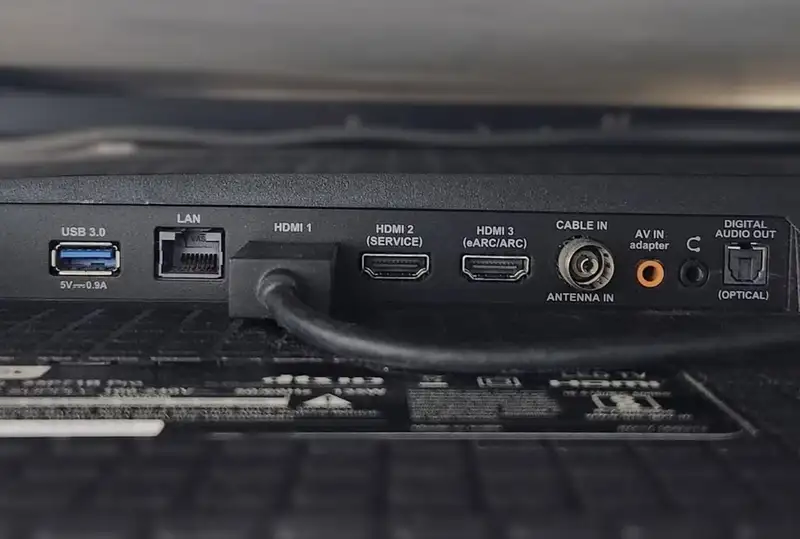
- The 'Service' or 'Diagnosis' port on a television is designed strictly as a communication gateway for authorized technicians to troubleshoot hardware issues and update low-level...
- These diagnostic terminals vary dramatically in physical appearance, taking the form of standard USB ports, HDMI slots, legacy RS-232 serial interfaces, or even 3.5mm...
- Attempting to plug consumer peripherals—such as media sticks, game controllers, or mobile phones—into a service port can cause system crashes, continuous boot loops, or permanent...
Walking behind a modern home entertainment setup often reveals a crowded panel of ports—HDMI slots occupied by gaming consoles, optical audio cables feeding soundbars, and USB drives housing media libraries. In this tight struggle for physical connections, a port marked "Service" or "Diagnosis" can look like a tempting lifesaver. However, plugging everyday electronics into this specific terminal is a gamble that could jeopardize your hardware, revealing a broader narrative about user safety, proprietary repair systems, and the hidden mechanics of modern display technology.
Quick summary
- The "Service" or "Diagnosis" port on a television is designed strictly as a communication gateway for authorized technicians to troubleshoot hardware issues and update low-level system firmware.
- These diagnostic terminals vary dramatically in physical appearance, taking the form of standard USB ports, HDMI slots, legacy RS-232 serial interfaces, or even 3.5mm headphone-style jacks.
- Attempting to plug consumer peripherals—such as media sticks, game controllers, or mobile phones—into a service port can cause system crashes, continuous boot loops, or permanent physical damage.
Why it matters
As smart televisions transition into central hubs for home automation, high-performance gaming, and streaming media, physical port real estate has become highly valuable. When users run out of vacant HDMI or USB connections, the confusion surrounding "Service" ports can lead to costly mistakes. Understanding the limitations of these proprietary interfaces is crucial for protecting expensive home entertainment equipment from accidental electrical damage or software corruption. Additionally, this issue shines a light on the ongoing tension between consumer convenience and restrictive manufacturer repair policies, as diagnostic access remains largely locked behind these proprietary physical portals.
Background
Before the era of internet-connected smart TVs, diagnosing a hardware failure or updating a television's operating software required a physical connection to the device's internal motherboard. Manufacturers historically used dedicated legacy interfaces to run diagnostics. For instance, Samsung pioneered the "EX-LINK" port—a specialized serial connection often masquerading as a standard 3.5mm audio jack—to allow repair tools to communicate directly with the TV's processor. Other brands utilized physical RS-232 serial ports or kept these connections hidden beneath protective plastic stickers on the back panel.
As manufacturing processes modernized and became more cost-effective, electronics companies began utilizing standardized, off-the-shelf physical components. Instead of soldering custom diagnostic shapes onto motherboards, factories integrated common ports like USB and HDMI to double as diagnostic interfaces. This cost-saving measure meant that while a port might physically look like a standard USB port, its underlying electrical routing and firmware instructions were wired entirely for low-level system interaction, not consumer media playback.
The Hidden Risks of Misaligned Hardware
The primary hazard of using a diagnostic port for daily accessories stems from how these connections manage electrical power and data. Standard consumer USB ports are designed to supply a steady 5-volt current and manage active data handshakes for storage drives or peripheral controllers. In contrast, a USB-shaped service port may lack the necessary power regulators or data controllers. When a standard device is inserted, the TV's system may fail to identify the peripheral, leading to sudden firmware freezes, persistent crash screens, or, in rare instances, electrical short circuits that can destroy the motherboard.
Similarly, service ports using the HDMI form factor do not transmit standard audio or video signals. They are configured to carry serial diagnostic data instead of high-bandwidth video streams. Plugging an active video source, like a PlayStation or an Apple TV, into an HDMI-shaped service port will result in a blank screen at best, and potential feedback damage to the source device's HDMI transmitter at worst.
How to Safely Address a Shortage of TV Ports

For home entertainment enthusiasts running out of input options, utilizing a service port is never the solution. Instead, several safe, affordable alternatives exist to expand your system's connectivity without risking damage. If your television lacks sufficient HDMI inputs, investing in an external HDMI switcher is the most reliable path. These devices take multiple HDMI inputs—such as a gaming console, a cable box, and a streaming stick—and route them through a single cable to one of your TV's active consumer ports, allowing you to toggle between inputs with a remote control.
For those running out of USB ports to power accessories like ambient LED backlights or streaming dongles, a powered USB hub is an excellent alternative. Rather than drawing power directly from the TV's fragile motherboard, a powered hub plugs into a standard wall outlet, supplying clean, stable electricity to your accessories. This not only preserves your television's hardware from power overload but also ensures that accessories remain functional even when the television is powered off.
Qnews24h insight
The ongoing presence of "Service" ports shaped like standard consumer USB or HDMI interfaces represents a clear failure in intuitive product design. By prioritizing industrial manufacturing efficiency over clear user feedback, television manufacturers have created an unnecessary point of failure in the living room. Standardizing the physical shape of a diagnostic port to look identical to a consumer input invites accidental misuse, placing the burden of caution entirely on the buyer.
However, we are observing a welcome transition in newer display models. Modern smart televisions are increasingly phasing out physical service ports in favor of dual-purpose standard USB ports that only enter "maintenance mode" when they detect a highly specific, encrypted hardware handshake from a technician's tool. For older or mid-range sets that still feature dedicated diagnostic ports, the best rule of thumb remains simple: if a port is labeled "Service" or "Diagnosis," it should be treated as off-limits to ensure the longevity of your home theater system.
Sources
This report is based on technical specifications and diagnostic port analyses detailed by Znews.vn (Zing News) under their consumer electronics advisory coverage.
Why it matters
As smart televisions transition into central hubs for home automation, high-performance gaming, and streaming media, physical port real estate has become highly valuable. When users run out of vacant HDMI or USB connections, the confusion surrounding 'Service' ports can lead to costly mistakes. Understanding the limitations of these proprietary interfaces is crucial for protecting expensive home entertainment equipment from accidental electrical damage or software corruption.
Background
Before the era of internet-connected smart TVs, diagnosing a hardware failure or updating a television's operating software required a physical connection to the device's internal motherboard. Manufacturers historically used dedicated legacy interfaces to run diagnostics, such as Samsung's 'EX-LINK' port. As manufacturing processes modernized, electronics companies began utilizing standardized, off-the-shelf physical components (like USB and HDMI shapes) to double as diagnostic interfaces to save on manufacturing costs.
The ongoing presence of 'Service' ports shaped like standard consumer USB or HDMI interfaces represents a clear failure in intuitive product design. By prioritizing industrial manufacturing efficiency over clear user feedback, television manufacturers have created an unnecessary point of failure in the living room. Standardizing the physical shape of a diagnostic port to look identical to a consumer input invites accidental misuse, placing the burden of caution entirely on the buyer.
References
Editorial information
The editorial team reviews sources, adds context, and structures stories so readers can understand the news more clearly.
Article from QNEWS24H
Comments
(0)No comments yet. Be the first to share your thoughts.