Unlocking One UI: Three Power-User Features Hidden on Your Samsung Galaxy Device

- Separate App Sound enables users to split audio output routes between different Bluetooth and internal speakers based on the active application.
- Secure Folder leverages hardware-based Knox security to create a private sandboxed environment for confidential files and app duplicates.
- Dual Messenger clones popular communication platforms (WhatsApp, Telegram, Messenger) to run two accounts simultaneously on one device.
Modern smartphones have evolved into highly sophisticated pocket computers, packed with custom software skins that offer functionality far beyond standard operations. For years, Samsung’s custom Android overlay has stood as one of the most feature-dense ecosystems in the mobile industry. Yet, despite using these devices daily, a vast majority of users barely scratch the surface of what their Galaxy devices can actually do. While standard updates regularly introduce visual redesigns and security patches, many of the most practical productivity tools remain buried deep within the settings menu, waiting to be configured by power users.
Quick summary
- Separate App Sound: Allows users to split audio outputs, such as routing GPS navigation voice instructions through the phone speaker while streaming music to a car's Bluetooth system.
- Secure Folder: Creates an isolated, hardware-encrypted sandbox to store sensitive applications, photos, and files away from the main system partition.
- Dual Messenger: Enables running two distinct accounts on the same messaging application simultaneously without needing third-party cloning apps.
Why it matters
As the boundary between personal life and professional responsibilities continues to blur, mobile users demand greater control over digital boundaries, privacy, and multitasking efficiency. Features like Separate App Sound and Dual Messenger address immediate real-world pain points—such as managing two separate messaging profiles on a single dual-SIM phone or preventing GPS voice prompts from interrupting a shared music playlist. Meanwhile, security tools like Secure Folder offer peace of mind in an era of rising digital theft and surveillance. Understanding how to leverage these built-in utilities saves users from downloading cluttered third-party apps, which often come with privacy risks and battery-draining ad networks.
Background
To understand the depth of Samsung's current software ecosystem, one must look back at its evolution. The early years of Samsung's Android presence were defined by TouchWiz—a software skin criticized for being slow, bloated, and visually unpolished. In late 2018, Samsung introduced One UI, a complete ground-up redesign focused on clean aesthetics, one-handed usability, and deeply integrated utility. Over subsequent iterations, Samsung made a concerted effort to optimize performance while keeping its signature advanced features. Furthermore, Samsung's aggressive policy of backporting new system features to older models ensures that even budget-friendly and previous-generation flagship devices can enjoy advanced custom audio controls, security protocols, and multitasking setups.
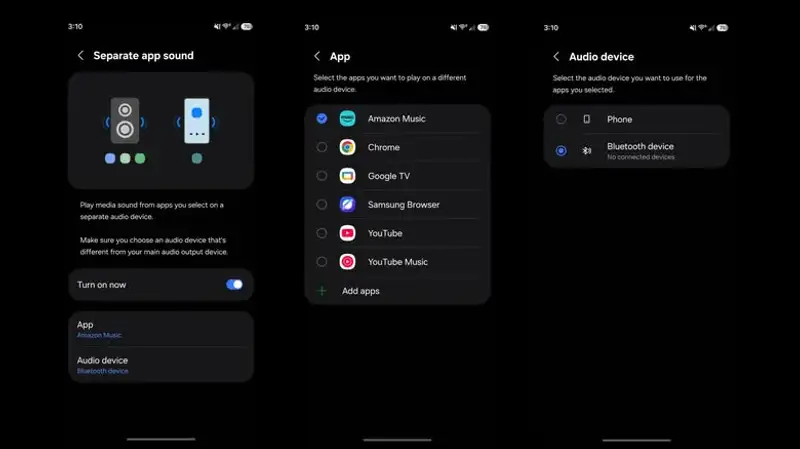
The Magic of Audio Split-Streaming: Separate App Sound
One of the most overlooked capabilities of Galaxy devices is the physical separation of audio streams. On standard operating systems, any media played will default to whatever audio output device is currently active—whether that is the phone's internal speaker, a pair of wireless earbuds, or a car speaker system. This creates a frustrating experience when, for instance, a driving route guidance voice cuts off the music playing for your passengers.
Samsung solves this with Separate App Sound. Once configured, you can assign a specific application (like Spotify) to always stream through a Bluetooth speaker, while another application (like Google Maps or Waze) broadcasts its audio alerts directly through the phone’s built-in speaker. To activate this, navigate to Settings > Sounds and Vibration > Separate App Sound, enable the toggle, and select your preferred application and target audio device.
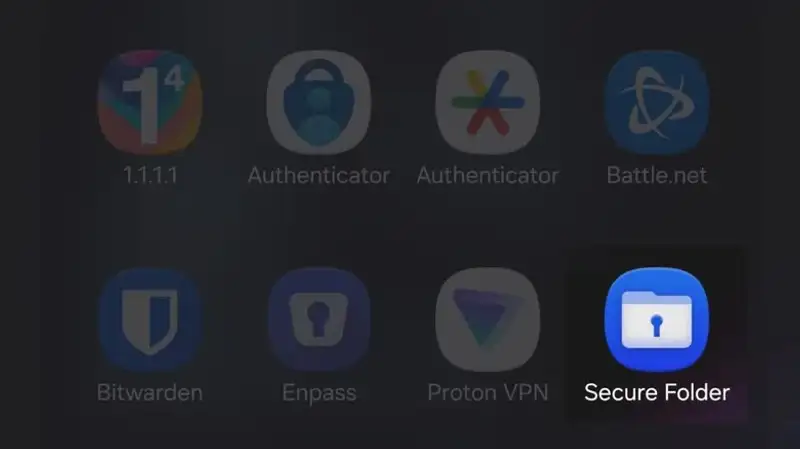
Digital Fortresses: Secure Folder
While Google has recently introduced "Private Space" to stock Android, Samsung has long championed its own secure ecosystem through Secure Folder. Underpinned by Samsung Knox—a defense-grade security platform integrated directly into the device's hardware—Secure Folder is much more than a simple hidden folder.
Secure Folder functions as an entirely separate virtual Android environment. When you copy an app into this space, it operates independently of the app installed on your main home screen. You can store sensitive personal banking apps, confidential business documents, or private photos here, protected by an independent PIN, password, or biometric lock. To set it up, go to Settings > Security and Privacy > More Security Settings > Secure Folder. Once created, you can customize the icon and rename it to blend in with your standard app drawer, providing an extra layer of visual discretion.
Dual Messenger: Streamlining Multi-Account Lifestyles
For individuals who manage both a personal and a professional phone number on a single dual-SIM device, managing chat applications can be incredibly frustrating. Most major platforms, like WhatsApp, Facebook Messenger, and Telegram, restrict users to a single active account per device profile.
Samsung addresses this structural limitation with Dual Messenger. This feature creates an isolated clone of compatible messaging applications, allowing you to run two active instances of the same app side-by-side. The cloned app functions identically to the original but is marked with a distinct orange icon overlay in the corner so you do not accidentally message from the wrong account. This eliminates the tedious process of repeatedly logging in and out or resorting to clunky mobile web browsers to check secondary chat feeds.
Qnews24h insight
Samsung’s biggest challenge is no longer about adding more features; it is about discoverability. One UI is a powerhouse of utility, but by prioritizing a clean, minimalist look out of the box, Samsung has inadvertently buried some of its most compelling selling points under multiple layers of settings menus. When compared to the relatively rigid structure of Apple’s iOS or the simplified approach of Google’s Pixel UI, Samsung's deep personalization tools provide a clear advantage to those who take the time to configure them. Moving forward, as mobile platforms reach hardware parity, the real competition will lie in how intelligently software adapts to user contexts—such as automating these audio-routing and sandbox states based on geographic location or connection cues.
Sources
This article utilizes factual details regarding One UI features and menu structures as originally outlined by Thanh Nien.
Why it matters
These tools allow users to maximize productivity, maintain distinct boundaries between work and personal life on dual-SIM setups, and protect sensitive data without relying on risky third-party utility applications.
Background
Samsung's custom software has transitioned from the bloated and slow TouchWiz interface into the highly optimized One UI, where power-user features are deeply integrated into the system kernel and frequently backported to older devices via system updates.
While competitors try to simplify user experiences by restricting settings, Samsung's philosophy remains rooted in granular control. The next phase of smartphone utility will likely depend on AI helping users discover these deeply buried features exactly when they need them.
References
Editorial information
The editorial team reviews sources, adds context, and structures stories so readers can understand the news more clearly.
Article from QNEWS24H
Comments
(0)No comments yet. Be the first to share your thoughts.