Google Earth Unlocks Free Web Flight Simulator, Elevating Global Exploration for All
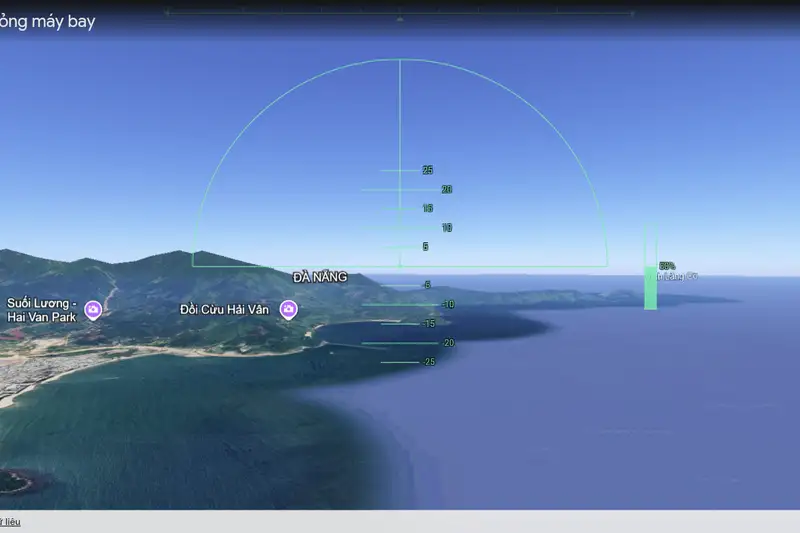
- Google Earth's flight simulator is now freely accessible on its web version, migrating from its desktop-only status since 2007.
- This update is part of Google's broader initiative to enhance the web interface, incorporating new features like elevation profiles and additional data layers.
- The web-based simulator offers a casual and engaging exploration experience, allowing users to virtually fly around the globe with simple controls.
- The feature aims to democratize virtual global exploration, making it accessible to a wider audience without the need for software installation.
A popular feature once confined to desktop applications, Google Earth's integrated flight simulator has now soared onto the web, offering free access to anyone with a browser. This long-awaited transition marks a significant step in Google's ongoing endeavor to democratize virtual global exploration, allowing a broader audience to navigate the planet's vast digital terrain from a pilot's perspective without the need for dedicated software installations.
Quick summary
- Google Earth's flight simulator, previously a desktop-exclusive feature since 2007, is now freely available on its web platform.
- The release is part of a wider initiative by Google to enhance the web interface with new functionalities like elevation profiles and additional data layers.
- Users can easily access the simulator through the Google Earth website, offering a casual exploration experience for both novices and enthusiasts.
- The web-based simulator emphasizes discovery over complex gameplay, providing an accessible gateway to virtual flight without specific missions or achievements.
Why it matters
The arrival of Google Earth's flight simulator on the web fundamentally shifts how users can interact with and explore the world. For years, this immersive tool was tethered to desktop installations, limiting its reach to those with specific operating systems or the willingness to download an application. By bringing it to the browser, Google effectively lowers the barrier to entry, making virtual flight accessible to millions more globally, regardless of their device or technical proficiency.
This move is particularly impactful for educational institutions and casual explorers. Educators can now seamlessly integrate virtual flight experiences into their curricula, allowing students to 'fly' over historical sites, geographical landmarks, or urban centers in real-time, directly from a web browser. For the general public, it transforms Google Earth from a mere map service into an interactive entertainment and learning platform, fostering curiosity about different cultures and landscapes in a highly engaging manner.
Moreover, it underscores a broader industry trend towards web-first experiences. As internet speeds improve and browser capabilities advance, companies like Google are increasingly investing in sophisticated web applications that can rival or even surpass desktop software. This enhances user convenience and ensures that features remain up-to-date without manual updates, making digital exploration more dynamic and responsive.
Background
The flight simulator feature itself is not new; it first appeared in Google Earth's desktop application in 2007, quickly becoming a cult favorite among tech enthusiasts and geography buffs. It offered a rudimentary but effective way to navigate Google's expansive 3D world, providing a unique perspective that traditional map views couldn't match. However, its desktop-only status meant it remained a niche feature, often overlooked by the majority of Google Earth's user base.
Over the years, Google has steadily invested in improving the web version of Google Earth, striving for feature parity with its desktop counterpart while simultaneously optimizing for browser performance and user experience. This current update is a culmination of those efforts, addressing a long-standing request from the community to bring popular desktop functionalities, like the flight simulator, into the accessible web environment.
Beyond the flight simulator, this release is part of a more comprehensive overhaul. Google has also rolled out new features such as elevation profiles, which provide detailed topographical data, new input methods for enhanced navigation, and additional data layers that offer richer contextual information. These improvements collectively aim to make Google Earth on the web a more robust, versatile, and engaging platform, moving beyond its basic mapping origins to become a comprehensive tool for discovery and learning.
Qnews24h insight
Google's decision to unleash the flight simulator onto the web is a shrewd strategic play, positioning Google Earth not just as a utilitarian mapping tool but as a vibrant, interactive 'edutainment' platform. While it doesn't aim to compete directly with high-fidelity, dedicated flight simulators like Microsoft Flight Simulator or Ace Combat—which offer hyper-realistic physics and complex gameplay mechanics—Google Earth's version carves out its own niche. It caters to the casual explorer, prioritizing accessibility and immediate engagement over intricate controls or mission-based objectives.
This move reflects a deeper understanding of modern user behavior: convenience and instant gratification often trump deep technical engagement for a vast majority. By making a once-exclusive, somewhat 'geeky' feature available with a few clicks in a browser, Google is tapping into the inherent human desire for exploration and discovery, presented in a low-friction, high-reward format. It implicitly encourages users to spend more time within the Google ecosystem, fostering a renewed appreciation for geospatial data and digital landscapes.
Furthermore, it demonstrates Google's ongoing commitment to pushing the boundaries of what web browsers can achieve. The seamless integration of a 3D flight simulator within a browser highlights advancements in web technologies, signaling a future where increasingly complex applications can run effortlessly without local installations. This is not just about a flight simulator; it's about making advanced interactive experiences universally available, solidifying Google Earth's role as a pioneering platform for digital exploration in the browser era.
Sources
How to use the Google Earth Flight Simulator
Getting started with the new web-based flight simulator is straightforward. Users simply need to navigate to the Google Earth website. Once there, click on the 'Explore Earth' button, which is usually represented by a compass icon or a similar navigation prompt. From the exploration menu, or directly via the main interface, users can then use the search bar to pinpoint a specific destination they wish to fly over, such as the Grand Canyon, the Eiffel Tower, or even their hometown.
After selecting a destination, access the flight simulator by going to the 'Tools' menu, typically found in a sidebar or dropdown, and selecting 'Flight Simulator Mode.' This will initiate the virtual flight experience. While the game does not display on-screen controls, Google provides comprehensive instructions on its developer website. Generally, users can steer the aircraft using their mouse or the arrow keys on their keyboard. Adjusting thrust is managed by the 'Page Up' and 'Page Down' keys, allowing for acceleration and deceleration.
It's worth noting that mastering the controls might take a bit of practice, as sudden movements can cause the virtual aircraft to flip or lose control. The absence of specific missions or scoreboards means the focus is purely on the joy of exploration and the freedom of flight. Users are encouraged to experiment and discover breathtaking views, perhaps even attempting daring maneuvers like flying under famous landmarks, knowing they can restart their flight as many times as they wish for endless entertainment.
New Features Beyond Flight
The introduction of the web flight simulator is merely one component of Google's broader strategy to enrich the Google Earth web experience. Parallel to this exciting update, Google has rolled out several other enhancements designed to make the platform more informative and intuitive. One notable addition is the implementation of elevation profiles. This feature allows users to visualize topographical data, providing detailed insights into the terrain's height and contours along a chosen path. This is invaluable for hikers, urban planners, and anyone interested in geographical analysis, offering a deeper understanding of the physical landscape.
Furthermore, Google has introduced new types of input methods, though specific details on these were not provided in the initial announcement, they generally aim to improve user interaction and navigation precision. This could include more refined touch controls for mobile devices, or advanced keyboard shortcuts for desktop users, making the exploration journey smoother and more adaptable to various user preferences. These input enhancements work in tandem with the refined interface to offer a more seamless and personalized user experience.
Finally, the platform has also been bolstered with additional data layers. These new layers allow users to overlay various types of information onto the globe, ranging from historical imagery to environmental data, or even user-contributed content. Such layers transform Google Earth into a powerful research and visualization tool, enabling users to delve into specific topics with rich contextual information, further expanding its utility beyond simple navigation. These combined features underscore Google's commitment to evolving Google Earth into a comprehensive, interactive digital globe.
Why it matters
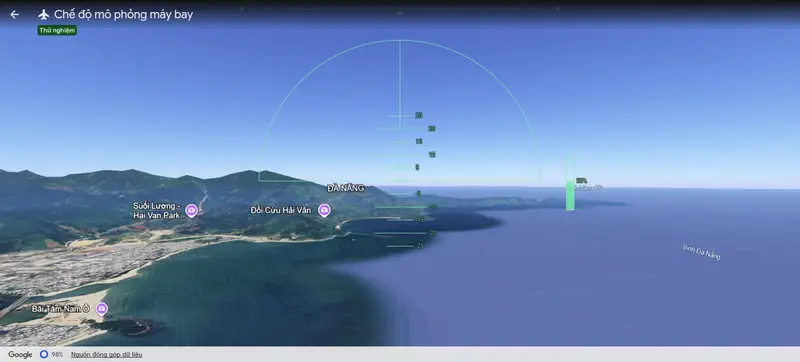
The migration of Google Earth's flight simulator to its web platform significantly democratizes access to immersive virtual global exploration. By removing the need for a desktop application, Google opens up this engaging feature to a much broader audience, including users on various operating systems and those who prefer browser-based experiences. This move enhances Google Earth's utility as an educational and entertainment tool, fostering curiosity about geography and cultures globally. It also highlights Google's ongoing commitment to developing sophisticated web-first applications, pushing the boundaries of what's possible within a browser and reflecting a wider industry trend towards...
Background
The flight simulator has been an integral, albeit niche, feature of Google Earth's desktop application since its introduction in 2007. For over a decade, it offered users a unique, pilot-style perspective for navigating the digital globe, separate from the standard map and street views. This desktop exclusivity, however, meant a significant portion of Google Earth's user base, particularly those relying on web access or mobile devices, could not experience it. The current update aligns with Google's sustained efforts to evolve Google Earth's web interface, gradually bringing more advanced functionalities previously confined to desktop software to the browser. This strategy aims to unify the...
Google's decision to bring its flight simulator to the web is more than just a feature update; it's a strategic move that redefines Google Earth's positioning in the digital landscape. By making this immersive tool universally accessible via a browser, Google is intentionally broadening Google Earth's appeal from a utilitarian mapping service to an interactive 'edutainment' platform. This caters to a growing demand for frictionless, engaging digital experiences that blend learning with leisure. While not competing with hardcore flight simulators, Google Earth leverages its vast geospatial data to offer a unique, low-barrier entry point into virtual exploration, thereby deepening user...
References
Editorial information
The editorial team reviews sources, adds context, and structures stories so readers can understand the news more clearly.
Article from QNEWS24H
Comments
(0)No comments yet. Be the first to share your thoughts.