Google Drive Halts Automatic Photo Sync to Google Photos: What Desktop Users Need to Know
- Google will end automatic photo synchronization from desktop-based Google Drive backups to Google Photos as of August 10, 2026.
- This change means new photos uploaded via Drive on desktop will no longer appear in Google Photos automatically and will consume redundant Drive storage.
- Users, especially those managing large photo libraries from desktop computers or professional cameras, are most affected and risk quickly depleting free storage.
- To adapt, users must manually upload photos directly to Google Photos via its web interface or mobile app, and disable photo backup features within Google Drive's desktop settings.
A critical policy update from Google is set to reshape how millions of users manage their digital photo collections, particularly those who rely on desktop backups. The tech giant has announced that, starting August 10, 2026, it will no longer support the automatic synchronization of images backed up through Google Drive's desktop application with Google Photos. This change signals a clearer delineation between Google's file storage and photo management services, demanding immediate attention from users to avoid potential data management pitfalls and unexpected storage costs.
Quick summary
- Google will end automatic photo synchronization from desktop-based Google Drive backups to Google Photos as of August 10, 2026.
- This change means new photos uploaded via Drive on desktop will no longer appear in Google Photos automatically and will consume redundant Drive storage.
- Users, especially those managing large photo libraries from desktop computers or professional cameras, are most affected and risk quickly depleting free storage.
- To adapt, users must manually upload photos directly to Google Photos via its web interface or mobile app, and disable photo backup features within Google Drive's desktop settings.
Why it matters
This policy adjustment carries significant implications for user experience, data management, and potentially, personal finances. For years, the seamless integration between Google Drive and Google Photos allowed many to effortlessly back up their visual memories. The cessation of this automatic sync means that users who do not proactively adjust their settings risk consuming their Google Drive storage allocation at an accelerated rate with redundant photo copies. This could lead to a 'storage full' notification much sooner than anticipated, compelling users to upgrade to paid Google One plans unnecessarily.
Beyond the immediate financial impact, the change also introduces a new layer of complexity for managing digital assets. Users accustomed to a 'set-it-and-forget-it' backup process will now need to be more hands-on. This affects not just casual users but particularly photographers, creative professionals, and anyone with extensive local photo libraries who relied on Drive as a conduit to their Photos cloud storage. Misunderstanding this change could result in either lost files (if not backed up correctly) or a fragmented photo library spread across different Google services without proper synchronization.
Background
Google's approach to cloud storage and photo management has seen several evolutions over the past decade. Historically, Google offered virtually unlimited storage for 'high-quality' (compressed) photos on Google Photos, making it a highly attractive service for backing up visual content. However, this policy began to shift significantly, culminating in an announcement in June 2021 that all new 'high-quality' photos would count towards a user's 15GB free storage limit, aligning Photos' storage policy with that of Drive and Gmail.
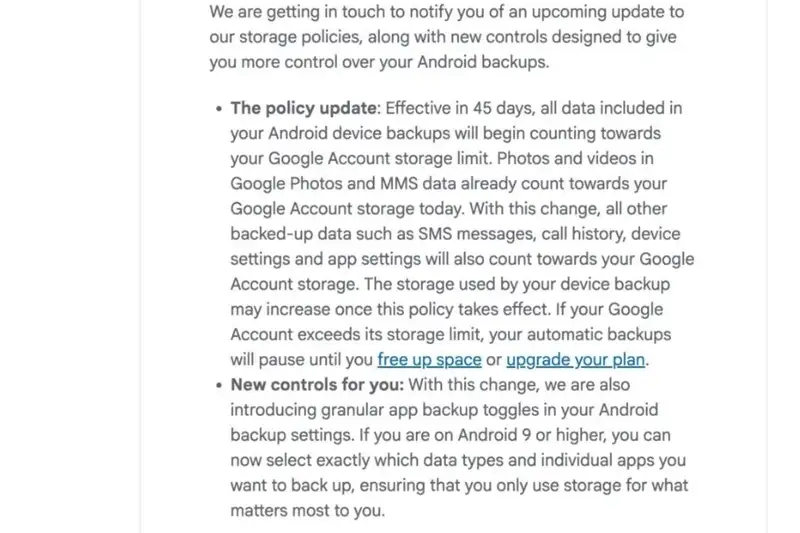
The current announcement, which the source indicates was preceded by a broader storage policy change notice in June 2026, further refines Google's ecosystem. It signals a move towards clearer boundaries between its services: Google Drive for general file storage and document management, and Google Photos for dedicated image and video management. This separation aims to streamline each platform's core function but requires users to understand and adapt to distinct backup workflows for each service, moving away from an implicitly unified system for photos.
Google's Evolving Storage Strategy: A Deeper Dive
The upcoming change isn't just a minor tweak; it reflects Google's strategic intent to refine its cloud offerings and encourage more deliberate engagement with its specialized services. By discontinuing the automatic cross-platform sync, Google is effectively telling users that Google Drive is for files and Google Photos is for photos, each with its own preferred upload mechanism.
For users who have been backing up entire photo folders from their desktops to Google Drive, expecting them to automatically appear in Google Photos, this connection will soon be severed. Old images uploaded before August 10, 2026, will remain in Google Photos. However, any new images added to those Drive-synced folders post-deadline will simply sit in Drive, consuming valuable general storage space without integrating into the Photos library interface.
Who is Most Affected?
While smartphone users, who typically use the Google Photos mobile app for direct backups, might experience minimal disruption, desktop users face a more immediate challenge. This group includes:
- Professional Photographers and Enthusiasts: Individuals who manage large RAW or high-resolution JPEG files on their computers, often importing them from dedicated cameras, and previously used Drive's desktop client for initial cloud backup.
- Users with Legacy Photo Libraries: Those who maintain extensive, organized photo archives on their personal computers, developed over years, and relied on Drive for automated cloud mirroring.
- Anyone Using Drive as a 'Catch-All' Backup: Users who simply pointed Drive's backup client to their 'Pictures' folder without fully understanding the underlying sync mechanisms.

Navigating the New Landscape: What Users Need to Do
Adapting to Google's new policy requires a two-pronged approach: actively managing where your photos are uploaded and intelligently disabling redundant backup features to conserve storage.
Direct Upload to Google Photos Web
To ensure new photos from your computer continue to be backed up to Google Photos, users will need to utilize the dedicated Google Photos web interface. The process is straightforward:
- Navigate to photos.google.com in your web browser.
- Click on the '+' icon (or the 'Upload' button, depending on the interface).
- Select the 'Back up folders' option.
- Point the system to the specific photo folders on your computer that you wish to back up to the cloud.
- Grant the necessary access permissions.
It's crucial to note that this method typically requires the web page or a dedicated web application to remain open for the upload process to complete. For Mac users, specifically those using Apple Photos, the recommendation is to first synchronize their libraries via iCloud and then use the Google Photos mobile app to back up the synchronized content.
Disabling Drive Photo Sync
To prevent wasteful storage consumption on Google Drive, it's highly advisable to disable the automatic backup of photo folders within your Google Drive desktop application. Here's how:
- Open the Google Drive application on your computer.
- Click on the Settings icon (often represented by a gear or cogwheel).
- Go to 'Preferences'.
- Select 'My Computer' (or 'Folders from your computer').
- Locate the folders containing your images that were previously set to sync with Google Drive.
- Uncheck the option 'Sync with Google Drive' for these specific folders.
- Confirm by clicking 'Done' and then 'Save'.

By taking these steps, users can regain control over their storage, ensuring that photos are only uploaded to Google Photos and preventing redundant copies from unnecessarily filling up their Google Drive quota.
Beyond Google: The Importance of Diversified Backups
Regardless of the platform, the adage of 'multiple backups' remains paramount for digital data. While Google offers robust cloud storage, relying solely on one provider always carries inherent risks. Users are strongly encouraged to maintain additional backup copies of their precious photo libraries on external hard drives, network-attached storage (NAS) devices, or alternative cloud services. This diversified approach acts as a critical safeguard against data loss due to unforeseen policy changes, service interruptions, or even accidental deletions.
Proactive file management, including regularly checking the source of uploaded images via the 'File information' icon on the web interface, will become increasingly important for optimizing personal storage space. This vigilance ensures that every byte of cloud storage is utilized efficiently and purposefully.
Qnews24h insight
Google's decision to decouple automatic desktop Drive-to-Photos syncing is a clear signal of its ongoing strategy to rationalize and potentially monetize its vast ecosystem of services. This move pushes users towards a more structured and intentional approach to data management, subtly shifting the burden of data organization and optimization from an automated background process to direct user responsibility. While potentially inconvenient for some, it encourages a clearer understanding of where data resides and how storage is consumed. This could lead to a more efficient use of resources in the long run for those who adapt, but it also risks alienating users who prefer a 'hands-off' approach, potentially driving them towards rival services that still offer more integrated backup solutions or simpler storage models.
Sources
Frequently Asked Questions (FAQ)
Q1: When will Google stop automatically syncing photos from Google Drive to Google Photos?
A1: Google will officially stop supporting the automatic synchronization of photos backed up through Google Drive on desktop with Google Photos starting August 10, 2026.
Q2: What happens to my old photos that were synced before the deadline?
A2: Any photos and images that were uploaded and synced to Google Photos via Google Drive before August 10, 2026, will remain preserved and unaffected in your Google Photos library.
Q3: How can I continue backing up photos from my desktop to Google Photos after August 10, 2026?
A3: After the deadline, you will need to manually upload photos directly to Google Photos through its web interface (photos.google.com) by selecting the 'Back up folders' option, or continue using the Google Photos mobile app for device backups.
Q4: Why is Google making this change?
A4: While Google hasn't explicitly detailed every reason, this move aligns with a broader strategy to differentiate Google Drive as a general file storage service and Google Photos as a dedicated media management platform. It also encourages users to be more intentional about their storage choices and potentially subscribe to Google One plans if they exceed free storage limits.
Why it matters
This policy adjustment carries significant implications for user experience, data management, and potentially, personal finances. For years, the seamless integration between Google Drive and Google Photos allowed many to effortlessly back up their visual memories. The cessation of this automatic sync means that users who do not proactively adjust their settings risk consuming their Google Drive storage allocation at an accelerated rate with redundant photo copies. This could lead to a 'storage full' notification much sooner than anticipated, compelling users to upgrade to paid Google One plans unnecessarily. Beyond the immediate financial impact, the change also introduces a new layer of...
Background
Google's approach to cloud storage and photo management has seen several evolutions over the past decade. Historically, Google offered virtually unlimited storage for 'high-quality' (compressed) photos on Google Photos, making it a highly attractive service for backing up visual content. However, this policy began to shift significantly, culminating in an announcement in June 2021 that all new 'high-quality' photos would count towards a user's 15GB free storage limit, aligning Photos' storage policy with that of Drive and Gmail. The current announcement, which the source indicates was preceded by a broader storage policy change notice in June 2026, further refines Google's ecosystem. It...
Google's decision to decouple automatic desktop Drive-to-Photos syncing is a clear signal of its ongoing strategy to rationalize and potentially monetize its vast ecosystem of services. This move pushes users towards a more structured and intentional approach to data management, subtly shifting the burden of data organization and optimization from an automated background process to direct user responsibility. While potentially inconvenient for some, it encourages a clearer understanding of where data resides and how storage is consumed. This could lead to a more efficient use of resources in the long run for those who adapt, but it also risks alienating users who prefer a 'hands-off'...
References
- 1.soha.vn
Editorial information
The editorial team reviews sources, adds context, and structures stories so readers can understand the news more clearly.
Article from QNEWS24H
Comments
(0)No comments yet. Be the first to share your thoughts.