Clicked an Adult Link on Facebook? Immediate Recovery Steps to Secure Your Account
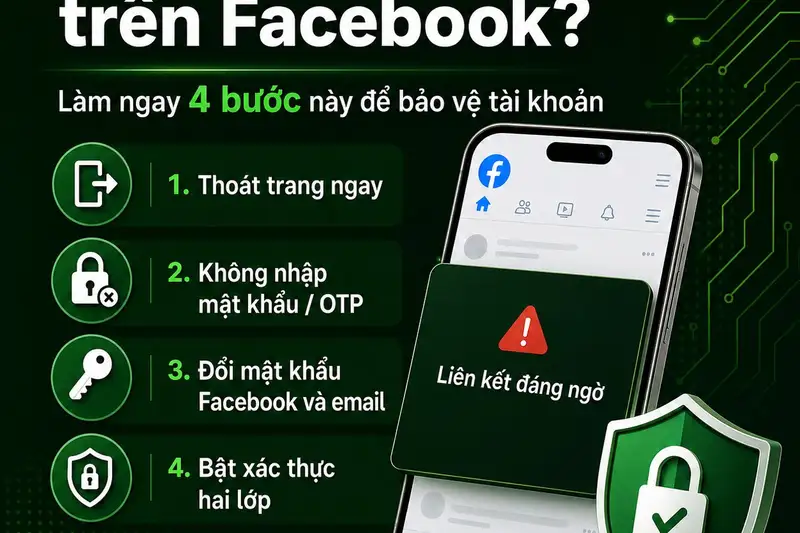
- Malicious adult (18+) links on Facebook are highly active phishing vectors designed to steal user passwords, session cookies, and personal identifiers.
- If clicked, users must immediately avoid inputting any data, change passwords on Facebook and linked emails, and turn on Two-Factor Authentication (2FA).
- Running a device-wide malware scan is highly recommended if a file download or app installation was initiated after clicking.
It takes only a fraction of a second for curiosity or an accidental screen tap to compromise your entire digital life. On social media platforms like Facebook, cybercriminals have long leveraged high-interest adult themes to bait users into clicking malicious links. These links are rarely harmless portals to explicit content; instead, they serve as highly effective trapdoors designed to harvest login credentials, hijack active sessions, and distribute malicious software. For the unsuspecting user, a single click can trigger a chain reaction leading to identity theft, financial fraud, and permanent loss of access to their online accounts.
Quick summary
- High-risk trap: Malicious 18+ links on Facebook are highly optimized phishing campaigns engineered to steal user credentials, session cookies, and personal data.
- Immediate action required: If clicked, users must immediately avoid entering any sensitive data, change passwords for both Facebook and associated emails, and activate Two-Factor Authentication (2FA).
- Device disinfection: In cases where a file download was initiated, conducting a comprehensive malware scan of your computer or mobile device is essential to neutralize background threats.
Why it matters
An compromised Facebook account is far more than an inconvenience; it is a gateway for broader cybercrime. Once bad actors gain control of an account, they can impersonate the victim to borrow money from friends, spread phishing links further, access linked business pages with active advertising budgets, or extort the owner using private messages. Furthermore, because many users reuse passwords across multiple digital platforms, a breach on Facebook often leads to subsequent compromises of email accounts, banking apps, and online shopping portals. Understanding how to react in the golden minutes immediately following a suspicious click is a critical digital survival skill.
Background
Social engineering tactics have evolved significantly from the rudimentary spam emails of the early internet. Today, cybercriminals deploy automated bots to drop tempting links disguised as adult videos or sensational news in Facebook comment sections, group feeds, and direct messages. These links often redirect victims through a complex chain of domain names designed to bypass Facebook's automated security filters.
Cybersecurity specialist Ngo Minh Hieu (widely known as Hieu PC), a key figure at Vietnam's National Cybersecurity Center and founder of the non-profit project "Chong Lua Dao" (Anti-Phishing), has repeatedly raised alarms about this persistent threat vector. According to security analysts, modern phishing sites do not just look identical to official Facebook login pages; they also utilize sophisticated scripts to steal session tokens, allowing attackers to bypass traditional login processes entirely.
The Immediate Recovery Checklist: What to Do Next
If you have recently clicked on a suspicious 18+ link, do not panic. Follow this systematic, high-priority guide to secure your digital footprint immediately.
1. Do Not Enter Any Information and Close the Tab

The moment you realize you are on an unfamiliar website, freeze. Under no circumstances should you input your Facebook username, password, one-time passwords (OTP), banking details, or email credentials. If the website prompts you to download a video player, update a browser extension, or install a mobile application to "verify your age," do not agree. Close the browser tab or app immediately. Many modern attacks rely on "drive-by downloads" where malware is installed silently in the background while the user is distracted by on-screen prompts.
2. Execute an Immediate Password Overhaul
If you suspect that your login credentials have been exposed—or if you entered your password on a fake login page—you must act fast. Change your Facebook password immediately. When crafting your new credentials, avoid predictable phrases. Use a complex combination of uppercase letters, lowercase letters, numbers, and unique symbols. Crucially, if you use the same password for the email address linked to your Facebook account, change that email password as well. Losing control of your recovery email makes recovering a hijacked Facebook account significantly harder.
3. Activate Two-Factor Authentication (2FA)
Two-Factor Authentication is your absolute best defense against unauthorized access. Even if a hacker successfully steals your username and password, they cannot access your account without the secondary verification code. Navigate to your Facebook security settings and enable 2FA. While SMS-based codes are helpful, security experts recommend using authenticator apps like Google Authenticator, Duo, or Microsoft Authenticator, as they are immune to SIM-swapping attacks.
4. Audit Active Sessions and Terminate Strangers
Facebook allows you to see every device currently logged into your account. Go to your settings menu, locate the "Security and Login" section, and review the active list under "Where You're Logged In." If you spot an unfamiliar phone model, a desktop browser you do not use, or a login location hundreds of miles away, use the "Log Out of All Sessions" option. This instantly revokes access for anyone currently snooping around your profile.
5. Run a Comprehensive Security Scan
If your accidental click occurred on a personal computer or an Android smartphone, there is a risk that malicious code was silently cached. Download and run a deep scan using a reputable, premium antivirus and anti-malware solution. This step will detect and isolate keyloggers, adware, or spyware that could be tracking your keystrokes to steal your new passwords.
Qnews24h insight
The persistent success of adult-themed link scams highlights the fundamental vulnerability of the "human firewall." No matter how advanced Meta's automated defense systems become, attackers will always find novel ways to obfuscate URLs and manipulate human curiosity. The real battlefield of cybersecurity has shifted from technical platform defenses to user education.
Users must move away from reactive security and adopt a proactive, zero-trust mindset. Treat every unexpected link in social media comments with skepticism. By standardizing basic hygiene practices—like utilizing password managers, keeping software updated, and treating 2FA as mandatory rather than optional—users can make themselves incredibly difficult targets for opportunistic scammers.
Sources
- Information and expert safety recommendations adapted from Soha.vn.
Why it matters
A hijacked Facebook account can lead to devastating consequences, including secondary identity theft, financial fraud via linked payment systems, extortion, and the spread of scams to your entire personal and professional network.
Background
Social engineering scams utilizing explicit themes have grown increasingly sophisticated. Scammers bypass social platform filters using complex redirect domains and lookalike login pages. Well-known cybersecurity experts, such as Ngo Minh Hieu, actively warn the public about these automated phishing grids targeting social media users.
Despite Meta's continuous security updates, scammers rapidly adapt their domain redirection tactics. The persistence of these scams proves that technological solutions are secondary to human vigilance. True digital defense requires users to maintain a strict zero-trust posture toward unsolicited links and treat 2FA as a non-negotiable security standard.
References
Editorial information
The editorial team reviews sources, adds context, and structures stories so readers can understand the news more clearly.
Article from QNEWS24H
Comments
(0)No comments yet. Be the first to share your thoughts.