Why Users Miss These 5 Classic iPhone Features: A Deep Dive into Apple's Design Choices

- Apple discontinued 3D Touch, replacing it with the slower, software-based Haptic Touch.
- The Touch ID fingerprint sensor was phased out in favor of the facial recognition system, Face ID.
- The 3.5mm headphone jack was removed from the iPhone, pushing users towards wireless audio solutions.
- iOS 11 altered Control Center toggles for Wi-Fi and Bluetooth, preventing a complete disable and raising privacy concerns.
In the relentless march of technological progress, smartphone manufacturers often face difficult decisions about what to keep, what to innovate, and what to leave behind. For Apple, this journey with the iPhone since its 2007 debut has been marked by both groundbreaking advancements and the quiet removal of features that, for many, had become integral to their daily digital lives. As devices become sleeker and digital security standards evolve, these hardware and software choices — made in the name of optimization — have left a dedicated user base yearning for the return of several once-standard functionalities.
Quick summary

- Apple discontinued 3D Touch, a pressure-sensing feature for quick previews and shortcuts, replacing it with the slower, software-based Haptic Touch.
- The tactile and convenient Touch ID fingerprint sensor, integrated into the Home button, was phased out in favor of the facial recognition system, Face ID.
- The universal 3.5mm headphone jack was removed from the iPhone, pushing users towards wireless audio solutions and adapter use.
- iOS 11 altered Control Center toggles for Wi-Fi and Bluetooth, preventing a complete disable and leading to potential security and battery concerns for some users.
- The ability to manage and organize iPhone applications directly through iTunes on a computer was eliminated, making on-device organization more cumbersome for users with many apps.



Why it matters

The absence of these once-common features impacts user experience in tangible ways, ranging from convenience and control to security and compatibility. For a significant segment of iPhone users, these changes represent a forced adaptation to Apple's vision, sometimes at the expense of their preferred workflows or existing accessories. The move away from the 3.5mm jack, for instance, created an instant barrier for audiophiles and those with extensive collections of wired headphones. Similarly, alterations to privacy controls like Wi-Fi/Bluetooth toggles raise concerns about constant connectivity and potential vulnerabilities. These shifts not only redefine how users interact with their devices but also influence broader industry trends, dictating accessory markets and user expectations for future smartphone designs.
Background

Apple’s history with the iPhone is a testament to iterative design and bold departures. Many of the features users now miss were once heralded as innovations themselves. 3D Touch, for example, first appeared with the iPhone 6s, offering a novel way to interact with the interface by sensing varying levels of pressure. It provided quick access to functions and content previews, particularly lauded by mobile gamers for its responsiveness. However, its adoption across the broader user base never quite reached Apple's apparent expectations, leading to its removal starting with the iPhone XR, replaced by the haptic-feedback-driven but less versatile Haptic Touch.
Before the advent of the bezel-less iPhone X and its sophisticated Face ID system, Touch ID was the gold standard for biometric authentication. Integrated seamlessly into the physical Home button, it offered swift and secure unlocking, app logins, and payment authorizations. While Face ID offered enhanced security through 3D facial mapping, its reliance on direct line of sight and the complete removal of the Home button represented a significant ergonomic shift. Users grew accustomed to the tactile reliability of Touch ID, especially in situations where facial recognition might be inconvenient, such as wearing masks or when the phone isn't perfectly aligned with the face.

The removal of the 3.5mm headphone jack with the iPhone 7 was perhaps one of Apple's most controversial decisions. Announced alongside the first-generation AirPods, this move was framed as a courageous step towards a wireless future, creating internal space for other components and enhancing water resistance. However, it effectively rendered countless wired headphones obsolete without the use of an adapter, creating inconvenience for users who wished to charge their device and listen to music simultaneously. This decision undeniably propelled the wireless audio market but also left many audiophiles lamenting the perceived reduction in audio quality compared to traditional wired connections.
The changes to Wi-Fi and Bluetooth toggles in iOS 11 were subtler but equally impactful for privacy-conscious users. Previously, a tap in the Control Center would fully disable these radio connections, conserving battery and reducing potential security risks. Post-iOS 11, these toggles merely disconnect from current networks or devices, only to automatically reactivate at 5 AM or upon device restart. To achieve a complete shutdown, users must navigate deeper into the Settings app, a friction point that many find unnecessary and inconvenient, raising questions about persistent device broadcasting.

Finally, the ability to manage and organize iPhone apps through iTunes on a computer was a cherished feature for those with extensive app libraries. Introduced early in the iPhone's history, it allowed for quick drag-and-drop reorganization of home screens, batch deleting, and seamless synchronization. Apple's gradual deprecation of iTunes, culminating in its removal from macOS and the shift towards on-device management, has transformed this efficient process into a more tedious, manual task on the device itself, especially for users with numerous app pages.
3D Touch: The Pressure-Sensitive Pioneer

3D Touch, introduced with the iPhone 6s, revolutionized how users interacted with their devices. By distinguishing between a tap and varying levels of pressure, it enabled 'peek and pop' gestures for content previews and quick actions directly from app icons. Gamers, particularly in first-person shooters, valued its precision for rapid aiming and firing without lifting fingers. Apple's decision to discontinue it, starting with the iPhone XR, and replace it with Haptic Touch, was reportedly due to lower-than-expected user adoption and the desire to simplify the manufacturing process. However, Haptic Touch, relying on a long press combined with haptic feedback, simply cannot replicate the speed and multi-level interaction offered by 3D Touch, leaving a void for power users and specific gaming communities.
Touch ID: The Reliable Fingerprint Sensor
Before Face ID became the standard, Touch ID provided a fast, secure, and highly reliable method for unlocking iPhones, authenticating purchases, and logging into apps. Its integration into the physical Home button made it incredibly intuitive. While Face ID offers advanced 3D facial mapping for enhanced security, it has its limitations. Users often report difficulties in certain lighting conditions, when wearing masks, or when the phone isn't at an optimal angle. Many prefer the tactile, 'no-look' convenience of Touch ID, especially for quick access in varied environments. The desire for its return, perhaps integrated into the power button like on some iPad models, underscores a preference for flexibility in biometric authentication.
The 3.5mm Headphone Jack: A Loss for Audiophiles and Convenience
The removal of the 3.5mm headphone jack with the iPhone 7 was a defining moment in smartphone design. Apple argued it freed up valuable internal space for other components like larger batteries and Taptic Engines, while also contributing to better water resistance. However, this forced users to embrace wireless headphones, like Apple's own AirPods, or rely on often cumbersome and easily misplaced dongles. For audiophiles, the perceived compromise in audio quality over Bluetooth compared to a direct wired connection remains a significant point of contention. The inconvenience of not being able to charge the phone and listen to wired audio simultaneously also highlights a practical limitation imposed by this design choice.
Control Center Wi-Fi and Bluetooth Toggles: A Question of Control
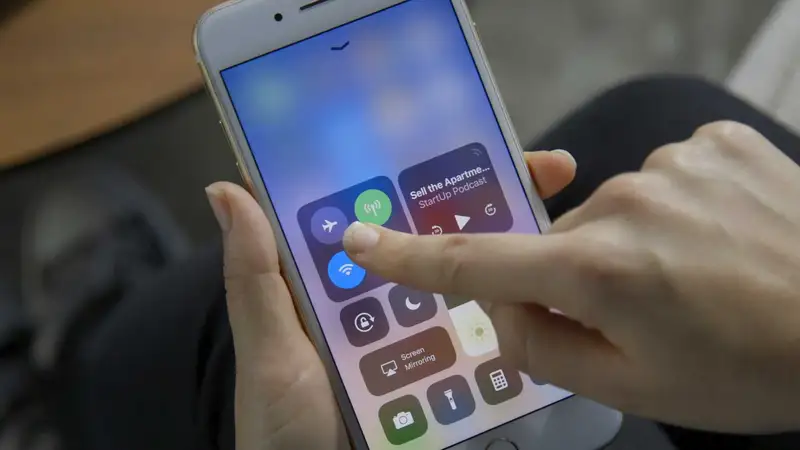
Prior to iOS 11, the Control Center offered straightforward toggles to completely disable Wi-Fi and Bluetooth. This allowed users to fully manage their device's radio connections, a practice important for privacy, security, and battery conservation. With the update, these toggles merely temporarily disconnect from current networks or devices, automatically reactivating under certain conditions. This 'soft off' approach means the radios are still scanning and broadcasting, potentially exposing the device to certain security risks and contributing to battery drain. Users wishing for complete control must navigate deeper into the Settings app, adding an unnecessary layer of complexity for a seemingly simple function.
iTunes App Management: The End of Desktop Convenience
For years, iTunes on a computer offered a superior way to manage iPhone applications. Users could visually arrange app icons across multiple home screens, group them into folders, and delete multiple apps simultaneously with simple drag-and-drop gestures, all synchronized effortlessly. Apple's decision to eliminate this functionality with iTunes 12.7, and later to entirely phase out iTunes from macOS in favor of dedicated apps, shifted app management entirely to the device itself. While this aligns with a mobile-first philosophy, for users with hundreds of apps or multiple home screens, organizing directly on the small screen can be a frustrating and time-consuming endeavor, demonstrating how desktop integration once provided significant user efficiency.
Qnews24h insight
Apple's trajectory of innovation often prioritizes a streamlined, 'future-proof' experience over retaining legacy features, a philosophy that both drives market trends and alienates a portion of its loyal user base. While decisions like removing the 3.5mm jack accelerated the adoption of wireless technologies and allowed for internal design optimizations, they also introduced friction and forced consumers into new ecosystems. The phase-out of 3D Touch and the tactile Touch ID, replaced by software-driven alternatives or Face ID, highlights a trade-off between hardware complexity and universal user engagement. The common thread here is Apple's pursuit of a singular, often controlled, vision of user interaction. However, the consistent clamor for the return of these older features suggests that flexibility, choice, and convenience — even if less 'futuristic' — still hold significant value for everyday users. Balancing this desire for innovation with practical user needs will remain a critical challenge for Apple as it continues to evolve the iPhone platform.
Sources
FAQ
Why did Apple remove the 3.5mm headphone jack from iPhones?
Apple removed the 3.5mm headphone jack starting with the iPhone 7. The company stated that this decision allowed for more internal space, which could be used for other components like a larger battery or Taptic Engine, and also contributed to improved water resistance for the device. It also aligned with Apple's push towards a wireless future, coinciding with the launch of its AirPods.
What is the key difference between 3D Touch and Haptic Touch?
3D Touch, introduced with the iPhone 6s, was a hardware-based feature that sensed varying levels of pressure applied to the screen, allowing for multi-level interactions like 'peek and pop' gestures. Haptic Touch, which replaced 3D Touch starting with the iPhone XR, is software-based and relies on a long press combined with haptic feedback. Haptic Touch is generally slower and lacks the nuanced pressure-sensing capabilities of 3D Touch, offering a less dynamic user experience.
Can I completely disable Wi-Fi and Bluetooth from the Control Center on modern iPhones?
No, not completely. Since iOS 11, tapping the Wi-Fi or Bluetooth icons in the Control Center only temporarily disconnects your device from current networks or accessories. These radios remain active for features like AirDrop, Handoff, and location services, and will automatically reactivate at 5 AM or if you restart your device. To fully disable them, you must navigate to the Wi-Fi and Bluetooth settings menus within the main Settings app.
Why do some users prefer Touch ID over Face ID for iPhone security?
Many users prefer Touch ID for its speed, reliability, and convenience in certain situations. Touch ID, a fingerprint sensor, allows for quick, tactile authentication without needing to look directly at the phone, making it ideal when wearing masks, in low light, or when the phone is not perfectly aligned with the face. Face ID, while highly secure, requires direct eye contact and optimal positioning, which can be less convenient for some users or in specific scenarios.
How did iTunes previously help manage iPhone applications, and why was it removed?
Before iTunes 12.7, users could connect their iPhone to a computer and use iTunes to visually manage their apps. This included dragging and dropping app icons to rearrange home screens, creating folders, and batch-deleting multiple apps on a larger display, with changes syncing instantly to the device. Apple gradually removed this feature, eventually phasing out iTunes on macOS in favor of dedicated apps, pushing app management entirely to the iPhone itself. This shift was part of Apple's move towards a more self-contained, mobile-centric management approach, though many found the desktop tool more efficient for large app libraries.
Why it matters
The removal of these beloved features directly impacts user convenience, control, and compatibility with existing accessories. It forces adaptation to Apple's evolving ecosystem, affects daily workflows, and raises questions about data privacy with always-on connectivity. These design choices not only shape individual user experiences but also influence broader industry trends in smartphone design and peripheral markets.
Background
Apple has consistently evolved the iPhone since 2007, often replacing established features with new technologies. 3D Touch, introduced with the iPhone 6s, offered pressure-sensitive interactions but saw limited widespread adoption before being phased out for Haptic Touch. Touch ID, a reliable fingerprint sensor on the Home button, was superseded by Face ID with the iPhone X, aligning with the trend for full-screen displays. The controversial removal of the 3.5mm headphone jack with the iPhone 7 was attributed to space optimization and water resistance, promoting wireless audio. Furthermore, iOS 11 changed Control Center functionality, making it impossible to fully disable Wi-Fi and...
Apple's recurring strategy of shedding 'legacy' features to make way for innovation or design simplification often creates a tension between forward-thinking technology and established user habits. While moves like the elimination of the headphone jack spurred the wireless accessory market, they also imposed immediate costs and inconveniences on users. The consistent demand for features like Touch ID or comprehensive Control Center toggles reveals that a segment of the user base values practical functionality, robust control, and flexibility over strict design purity or ecosystem push. For Apple, the challenge lies in striking a delicate balance: innovating without alienating long-term...
References
Editorial information
The editorial team reviews sources, adds context, and structures stories so readers can understand the news more clearly.
Article from QNEWS24H
Comments
(0)No comments yet. Be the first to share your thoughts.